
Device identification
Error rendering macro 'excerpt-include': User '712020:515aa595-e304-41f3-886a-d9b6b0b7f5a3' does not have permission to view the page 'DEV:Z-Wave man.info, product type, product ID'.
Terminology
Click to hide/unhide
Error rendering macro 'excerpt-include': User '712020:515aa595-e304-41f3-886a-d9b6b0b7f5a3' does not have permission to view the page 'DEV:Terminology Wave'.
Short description
Error rendering macro 'excerpt-include': User '712020:515aa595-e304-41f3-886a-d9b6b0b7f5a3' does not have permission to view the page 'DEV:About the Device'.
Basic Functions
Click to hide/unhide
Unable to render {include}
The included page could not be found.
Main applications
- Residential
- MDU (Multi Dwelling Units - apartments, condominiums, hotels, etc.)
- Light commercial (small office buildings, small retail/restaurant/gas station, etc.)
- Government/municipal
- University/college
Integrations
Error rendering macro 'excerpt-include': User '712020:515aa595-e304-41f3-886a-d9b6b0b7f5a3' does not have permission to view the page 'DEV:Integrations'.
Simplified internal schematics
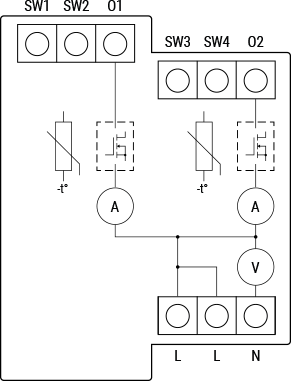
Device electrical interfaces
Inputs
Error rendering macro 'excerpt-include': User '712020:515aa595-e304-41f3-886a-d9b6b0b7f5a3' does not have permission to view the page 'DEV:Device electrical interfaces'.
Error rendering macro 'excerpt-include': User '712020:515aa595-e304-41f3-886a-d9b6b0b7f5a3' does not have permission to view the page 'DEV:Device electrical interfaces'.
Outputs
Error rendering macro 'excerpt-include': User '712020:515aa595-e304-41f3-886a-d9b6b0b7f5a3' does not have permission to view the page 'DEV:Device electrical interfaces'.
Connectivity
Error rendering macro 'excerpt-include': User '712020:515aa595-e304-41f3-886a-d9b6b0b7f5a3' does not have permission to view the page 'DEV:Connectivity'.
Safety features
Unable to render {include}
The included page could not be found.
Supported load types
Error rendering macro 'excerpt-include': User '712020:515aa595-e304-41f3-886a-d9b6b0b7f5a3' does not have permission to view the page 'DEV:Supported load types'.
Error rendering macro 'excerpt-include': User '712020:515aa595-e304-41f3-886a-d9b6b0b7f5a3' does not have permission to view the page 'DEV:Supported load types'.
Error rendering macro 'excerpt-include': User '712020:515aa595-e304-41f3-886a-d9b6b0b7f5a3' does not have permission to view the page 'DEV:Supported load types'.
Error rendering macro 'excerpt-include': User '712020:515aa595-e304-41f3-886a-d9b6b0b7f5a3' does not have permission to view the page 'DEV:Supported load types'.
Error rendering macro 'excerpt-include': User '712020:515aa595-e304-41f3-886a-d9b6b0b7f5a3' does not have permission to view the page 'DEV:Supported load types'.
User interface
Unable to render {include}
The included page could not be found.
LED Signalisation
Click to hide/unhide
Unable to render {include}
The included page could not be found.
LED blinking modes
Click to hide/unhide
Error rendering macro 'excerpt-include': User '712020:515aa595-e304-41f3-886a-d9b6b0b7f5a3' does not have permission to view the page 'DEV:LED_Signalization'.
Specifications
Error rendering macro 'excerpt-include': User '712020:515aa595-e304-41f3-886a-d9b6b0b7f5a3' does not have permission to view the page 'DEV:Technical Specifications'.
Basic wiring diagram
Error rendering macro 'excerpt-include': User '712020:515aa595-e304-41f3-886a-d9b6b0b7f5a3' does not have permission to view the page 'DEV:Wiring diagrams'.
Legend
Unable to render {include}
The included page could not be found.
About Z-Wave®
Adding and removing the Device to a Z-Wave® network
Click to hide/unhide
Unable to render {include}
The included page could not be found.
Z-Wave® Security and Device Specific Key (DSK)
Click to hide/unhide
Unable to render {include}
The included page could not be found.
Z-Wave® Parameters
Click to hide/unhide
Unable to render {include}
The included page could not be found.
Z-Wave® Command Classes
Click to hide/unhide
Unable to render {include}
The included page could not be found.
Z-Wave® Notifications Command Class
Click to hide/unhide
Unable to render {include}
The included page could not be found.
Z-Wave® Associations
Click to hide/unhide
Unable to render {include}
The included page could not be found.
Z-Wave® Important disclaimer
Error rendering macro 'excerpt-include': User '712020:515aa595-e304-41f3-886a-d9b6b0b7f5a3' does not have permission to view the page 'DEV:D&W Wave general for KB'.
Troubleshooting
For troubleshooting please visit our support portal: Support
Compatibility
| Gateway | Dimming 1 | Dimming 3 | SW Dimming 1 | SW Dimming 3 | D Control 1 | D Control 2 | D Control 3 | D Control 4 | D Binary 1 | D Binary 2 | D Binary 3 | D Binary 4 | Notes |
|---|---|---|---|---|---|---|---|---|---|---|---|---|---|
| Home Assistant | ✅ | ✅ | ✅ | ✅ | ✅ | ✅ | ✅ | ✅ | ✅ | ✅ | ✅ | ✅ | |
| Fibaro - HC 3 / Wave engine 3 | ✅ | ✅ | ✅ | ✅ | ✅ | ✅ | ✅ | ✅ | ✅ | ✅ | ✅ | ✅ | |
| Homey | ✅ | ✅ | ✅ | ✅ | ✅ | ✅ | ✅ | ✅ | ✅ | ✅ | ✅ | ✅ | *H |
| Homee Gen 7 | ✅ | ✅ | ✅ | ✅ | ✅ | ✅ | ⭐ | ⭐ | ✅ | ✅ | ✅ | ✅ | *1 |
| Homee Gen 5 | P*2 | P*2 | P*2 | P*2 | ⭐ | ⭐ | ⭐ | ⭐ | TBD | TBD | TBD | TBD | *2 |
| Smart Things | TBD | TBD | TBD | TBD | TBD | TBD | TBD | TBD | TBD | TBD | TBD | TBD | |
| Vera Ezlo | ✅ | ✅ | ✅ | ✅ | ⭐ | ⭐ | ⭐ | ⭐ | ⭐ | ⭐ | ⭐ | ⭐ | *3 |
| Cozify | TBD | TBD | TBD | TBD | TBD | TBD | TBD | TBD | TBD | TBD | TBD | TBD |
Notes:
- *H: Troubles with reports can be solved with this solution. The Wave Dimmer 2 PM needs to be integrated.
- *1: There’s no actions created for the scene control.
- *2: The gateway set an ordinary lifeline and there’s only one control for both of the output in the UI.
- *3: Does not have the capability to detect the different presses (CC control scene feature missing).
Function Meaning
| Function | Meaning / Tested |
|---|---|
| On/Off | If device responds to the app UI On/Off command |
| SW On/Off | If device reports On/Off changes by SW input |
| Dimming | If device responds to app UI dimming command |
| SW Dimming | If device reports dimming state change by SW input |
| Watts | If Watts are reported (unsolicited) |
| kWh | If kWh are reported (unsolicited) |
| Up/Down | If device responds to the app UI Up/Down command |
| SW Up/Down | If device reports Up/Down changes by SW input |
| Slats | If the slats respond to the app UI command |
| SW Slats | If the slats report the changes done by SW |
| D control | Detached mode: If device reports scene commands (single press, double press, etc.) |
| D Binary | Detached mode: If the device reports binary On/Off by SW input |
| Sensor # | Is the sensor report visualized in the gateway? Type of sensor in the notes. |
Legend
| Symbol | State |
|---|---|
 | Working / Possible |
 | Not Working / Not Possible |
| P | Partially |
| N/T | Not Tested |
| TBD | To be done |
Gateway guides
You may find useful guides on gateways in the Z-Wave Shelly Knowledge base.