
Shelly Plus 0-10V Dimmer
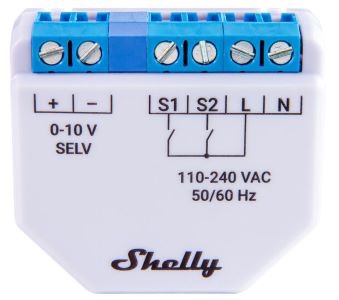
Device Identification
- Device name: Shelly Plus 0-10V Dimmer
- Device model: SNDM-00100WW
- Device SSID: ShellyPlus010V-XXXXXXXXXXXX
- Device Bluetooth ID:
0x1070 / 0x0780(GAP)
Short Description
The Shelly Plus 0-10V Dimmer is a smart 0-10V dimming controller that enables remote control of 0-10V dimming drivers via mobile phone, tablet, PC, or home automation systems. It can operate standalone on a local Wi-Fi network or be managed through cloud-based home automation services.
It supports remote access, control, and monitoring from anywhere with internet connectivity, provided the device is connected to a Wi-Fi router and the Internet.
The device includes an embedded Web Interface for monitoring, controlling, and adjusting settings.
Main Features
- Diverse driver integration: Supports 0-10V signal control for various drivers (lights, motors, valves, etc.)
- Shelly Plus Add-on compatible: Connects to sensor interfaces on Shelly Plus devices
- Switch/Button input mode: Flexible input control using switches or buttons
- One/dual button dimming control: Full functionality with any wall switch configuration
- Night mode: Set specific brightness levels during nighttime
- Min/Max brightness: Adjust dimming range for more precise brightness control
- Button fade rate: Control how quickly output brightness changes when holding a button
- Transition duration: Define time for dimming from 0% to 100%
- Schedules:
- Basic schedules: Weekly routines with brightness, transition duration, and flip value settings
- Advanced schedules: Year-round detailed scheduling with time adjustments from seconds to months
- Auto on/off timers: Set automatic on/off times
- Local actions: Create automation scenarios within the local Wi-Fi network
- Webhooks: Lightweight event-driven communication with other devices
- BLE Gateway: Enables communication between BLE and Wi-Fi devices
- Wi-Fi Range Extender: Retransmits Wi-Fi signals to extend coverage
- Scripting: Automate scenarios using scripts
- Compatibility: Works seamlessly with third-party home automation systems
- No need for hub: Ready for use locally or remotely via Shelly Smart Control or third-party platforms
Main Applications
- Residential
- MDU (Multi Dwelling Units – apartments, condos, hotels, etc.)
- Light commercial (small offices, retail stores, restaurants, gas stations, etc.)
- Government/municipal projects
- University/college facilities
- Farming operations
Use Cases
- Controls 0-10V signal for lights, motors, valves (depending on driver compatibility)
- Adjusts fan speed if motor/inverter has a 0-10V input (web interface shows light control interface)
- Controls valves with 0-10V input (web interface shows light control interface)
Integrations
Amazon Alexa Supported Capabilities
Yes
Google Smart Home Supported Traits
Yes
Samsung SmartThings Supported Capabilities
Yes
Simplified Internal Schematics
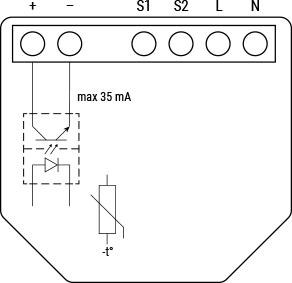
Device Electrical Interfaces
Inputs
- 2 switch/button inputs on screw terminals: S1 and S2
- 2 power supply inputs on screw terminals: N (Neutral) and L (Live)
Outputs
- 2 × 0-10V outputs on screw terminals: + and -
Add-on Interface
- Shelly proprietary serial interface
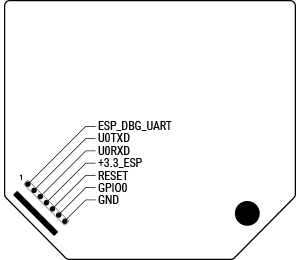
⚠ CAUTION! High voltage present on the add-on interface when the device is powered.
Connectivity
- Wi-Fi
- Bluetooth
Safety Function
- Overheating protection
Supported Load Types
- 0-10V signal control for multiple types of drivers (lights, motors, valves, etc.)
User Interface
Inputs
- One (Control) Button:
- Press and hold for 5 seconds → Enable Device Access Point and Bluetooth connection
- Press and hold for 10 seconds → Factory reset the device
Outputs
- LED (Monocolor) Indication:
| Status | LED Behavior |
|---|---|
| AP enabled, Wi-Fi disabled | 1 sec ON / 1 sec OFF |
| Wi-Fi enabled, not connected | 1 sec ON / 3 sec OFF |
| Connected to Wi-Fi network | Constantly ON |
| Cloud enabled, not connected | 1 sec ON / 5 sec OFF |
| Connected to Shelly Cloud | Constantly ON |
| OTA (Over-the-Air Update) | ½ sec ON / ½ sec OFF |
| Button pressed & held for 5 sec | ½ sec ON / ½ sec OFF |
| Button pressed & held for 10 sec | ¼ sec ON / ¼ sec OFF |
Note: The list starts with initial status and lowest priority. Each subsequent state overrides the previous one.
Specifications
| Category | Quantity | Value |
|---|---|---|
| Physical | ||
| Size (H×W×D) | 42×37×17 ±0.5 mm / 1.65×1.46×0.66 ±0.02 in | |
| Weight | 17 g / 0.60 oz | |
| Screw terminal max torque | 0.4 Nm / 3.5 lbin | |
| Conductor cross section | 0.5 to 1.5 mm² / 20 to 16 AWG (solid, stranded, bootlace ferrules) | |
| Conductor stripped length | 5 to 6 mm / 0.20 to 0.24 in | |
| Mounting | In-wall | |
| Shell material | Plastic | |
| Shell color | Shell: 2716C, Print: Black | |
| Environmental | ||
| Ambient working temperature | -20 °C to 40 °C / -5 °F to 105 °F | |
| Humidity | 30% to 70% RH | |
| Max. altitude | 2000 m / 6562 ft | |
| Electrical | ||
| Power supply | 110–240 VAC ±10% | |
| Power consumption | < 1.2 W | |
| Neutral required | No | |
| 0–10V voltage control type | Current sinking | |
| Output Circuits Ratings | ||
| Max. switching voltage | 10 VDC | |
| Max. switching power | 0.35 W | |
| Max. switching current | 35 mA | |
| Sensors, Meters | ||
| Internal temperature sensor | Yes | |
| Radio | ||
| Wi-Fi Protocol | 802.11 b/g/n | |
| RF Band | 2401 – 2495 MHz | |
| Max. RF Power | < 20 dBm | |
| Range | Up to 30 m indoors / 50 m outdoors (varies by environment) | |
| Bluetooth | ||
| Protocol | 4.2 | |
| RF Band | 2400 – 2483.5 MHz | |
| Max. RF Power | < 4 dBm | |
| Range | Up to 10 m indoors / 30 m outdoors (varies by environment) | |
| Microcontroller Unit | ||
| CPU | ESP32-U4WDH | |
| Flash | 4 MB | |
| Firmware Capabilities | ||
| Schedules | 20 | |
| Webhooks (URL actions) | 20 with 5 URLs per hook | |
| MQTT | Yes | |
| Scripting | Yes |
Basic Wiring Diagrams
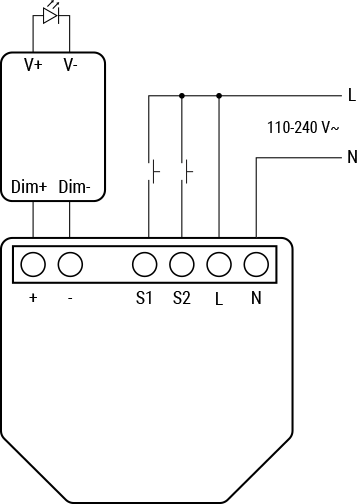
Legend
| Terminal | Description | Wire | Description |
|---|---|---|---|
| + | 0–10 VDC positive terminal | L | Live (110–240 V) wire |
| - | 0–10 VDC negative terminal | N | Neutral wire |
| S1 | Switch/button input terminal for light control | ||
| S2 | Switch/button input terminal for light control | ||
| L | Live (110–240 V) terminal | ||
| N | Neutral terminal |
Components and APIs
Compliance
- Shelly Plus Dimmer 0-10V Multilingual EU Declaration of Conformity (243)
- Shelly Plus Dimmer 0-10V UK PSTI ACT Statement of Compliance
Compliance Archive
Printed User Guide
Additional Resources
Installation Guides
There are no items with the selected labels at this time.