
Shelly Pro Dimmer 0/1-10V PM
Device Identification
- Device name: Shelly Pro Dimmer 0/1-10V PM
- Device model: SPCC-001PE10EU
- Device SSID: ShellyPro0110PM-XXXXXXXXXXXX
- BLE Model ID: 0x2011
Short Description
The Shelly Pro Dimmer 0/1-10V PM is a smart DIN-mountable dimming controller that enables remote control of dimmable drivers (lights, motors, valves, etc.) via mobile phone, tablet, PC, or home automation systems. It operates standalone on a local Wi-Fi network or through cloud-based home automation services. The device is a current-sourcing controller supporting both 0–10V and 1–10V driver types.
Main Features
- DIN rail mountable
- Power measurement: Precise energy consumption monitoring
- Bluetooth connectivity: Complies with Bluetooth standard for short-range data exchange
- BLE Gateway: Enables communication between BLE and Wi-Fi devices
- Wi-Fi: Connects to wireless networks
- Wi-Fi Range extender: Repeats and extends Wi-Fi signal reach
- Ethernet connectivity
- Scripting: Create custom automation scenarios via scripts
- Basic Schedules: Weekly schedules with brightness, transition duration, and flip value settings
- Advanced Schedules: Year-long, detailed scheduling with time adjustments from seconds to months
- Auto on/off timers: Set automatic on/off times
- Local actions: Automation within the local network (brightness, transition, flip value)
- Webhooks: Lightweight event-driven communication with other devices
- Compatibility: Works with third-party systems including KNX
- No hub required: Functions locally or remotely via Shelly Smart Control or external platforms
- Activity log: Stores detailed event history
- KVS (Key-value storage): Persistent storage for key-value pairs
- KNX support: Built-in KNXnet/IP communication
- Safety: Overcurrent, overvoltage, and overpower protection
- Virtual and BTHome components: Dynamically created user-defined components
- Diverse driver integration: Supports 0–10V and 1–10V signals; at 0% brightness, no light output and relay off. In UI/app, light appears "on" because no turn-off action has been triggered.
- Night Mode: Sets reduced brightness during nighttime hours
- Switch/Button input mode: Flexible control using one or two buttons:
- One-button dimming
- Dual-button dimming
- Transition duration: Controls time to transition between brightness levels
- Minimum brightness on toggle On: Default 3% when turning on if below threshold (excludes custom transitions in Schedules/Actions)
- Min/Max brightness: Adjusts dimming range for finer control
- Button fade rate: Speed of brightness change while holding button (default: 3x)
- Button presets: Applies state on double-click (default: 100%)
Use Cases
- Adjust brightness of 0–10V lights for optimal ambiance
- Automate lighting schedules throughout the day
- Retrofit existing lighting systems with current switches
- Sync lights with sunrise/sunset times using smart schedules
- Enable night mode for lower brightness at night
- Integrate with Home Assistant, Google Home, Alexa, SmartThings, and more
- Control dimming via single or double button press
- Monitor power usage for energy management
Integrations
Amazon Alexa supported capabilities
Yes
Google Smart Home supported traits
Yes
Samsung SmartThings supported capabilities
Yes
Simplified Internal Schematics
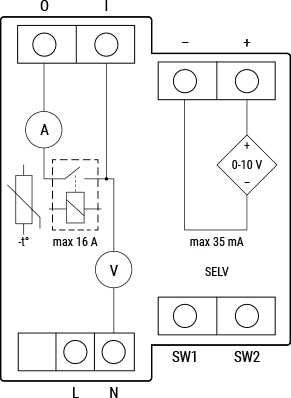
Device Electrical Interfaces
Inputs
- 2 switch/button inputs on screw terminals: S1, S2
- 2 power supply inputs on screw terminals: N (neutral), L (live)
- 1 relay input with power measurement on screw terminal
Outputs
- 2 × 0–10V outputs on screw terminals: +, –
- 1 relay output with power measurement on screw terminal
Connectivity
- Ethernet
- Wi-Fi
- Bluetooth
Safety Function
- Overheating protection
- Overvoltage protection
- Overcurrent protection
- Overpower protection
Supported Load Types
- 0–10V signal control (lights, motors, valves, etc.)
- 1–10V signal control
User Interface
Inputs
- One (Reset) button
- Press and hold for 5 seconds → enable Device Access Point and Bluetooth
- Press and hold for 10 seconds → factory reset
Outputs
- LED indication
- Power (red): On when power is connected
- Wi-Fi (varies):
- Blue: AP mode
- Red: STA mode, not connected to Wi-Fi
- Yellow: STA mode, connected to Wi-Fi but not to Shelly Cloud (or Cloud disabled)
- Green: STA mode, connected to Wi-Fi and Shelly Cloud
- Flashing Red/Blue: OTA update in progress
- LAN (green): On when LAN is connected
- Out (red): On when output is active
Specifications
| Quantity | Value |
|---|---|
| Physical | |
| Size (H×W×D) | 94×19×69 ±0.5 mm / 3.70×0.75×2.71 ±0.02 in |
| Weight | 70 g / 2.5 oz |
| Screw terminals max torque | 0.4 Nm / 3.54 lbin |
| Conductor cross section | 0.5–2.5 mm² / 20–14 AWG (green connectors); 0.5–1.5 mm² / 20–16 AWG (blue connectors) |
| Conductor stripped length | 6–7 mm / 0.24–0.28 in (green); 5–6 mm / 0.20–0.24 in (blue) |
| Mounting | DIN |
| Shell material | Plastic |
| Shell color | Blue |
| Connectors color | Green, Blue |
| Environmental | |
| Ambient working temperature | -20 °C to 40 °C / -5 °F to 105 °F |
| Humidity | 30% to 70% RH |
| Max. altitude | 2000 m / 6562 ft |
| Electrical | |
| Power supply | 110 – 240 V~ |
| Power consumption | < 3 W |
| Neutral not needed | No |
| 0–10V/1–10V voltage control type | Current sourcing |
| External protection | 16 A, tripping characteristic B or C, 6 kA interrupting rating, Energy limiting class 3 |
| Output circuits ratings | |
| Max. switching voltage | 240 V~ |
| Max. switching current | 16 A |
| Sensors, meters | |
| Voltmeter (AC) | Yes |
| Ammeter (AC) | Yes |
| Power and energy meters | Active and apparent power; Active and apparent energy; Power factor; Fundamental active and reactive energy |
| Measurement data storage | No |
| Internal temperature sensor | Yes |
| Radio | |
| Wi-Fi | |
| Protocol | 802.11 b/g/n |
| RF band | 2412 – 2472 MHz |
| Max. RF power | < 20 dBm |
| Range | Up to 30 m / 100 ft indoors, 50 m / 160 ft outdoors (depends on conditions) |
| Bluetooth | |
| Protocol | 4.2 |
| RF band | 2402 – 2480 MHz |
| Max. RF power | < 4 dBm |
| Range | Up to 10 m / 33 ft indoors, 30 m / 100 ft outdoors (depends on conditions) |
| Microcontroller unit | |
| CPU | ESP32-D0WDQ6 |
| Clock frequency | 40 MHz |
| Flash | 8 MB |
| Firmware capabilities | |
| Schedules | 20 |
| Webhooks (URL actions) | 20 with up to 5 URLs per hook |
| Scripting | Yes |
| MQTT | Yes |
| Advanced schedules | Yes |
| KVS (Key-Value Store) | Yes |
Basic Wiring Diagrams
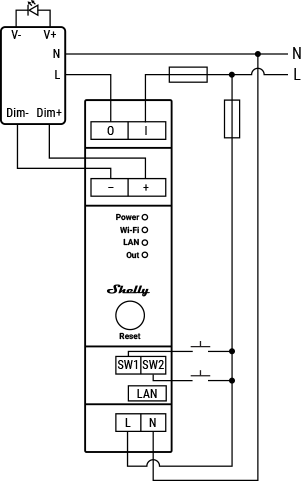
Legend
| Terminal | Description | Wire | Description |
|---|---|---|---|
| O | Relay output terminal | L | Live (110–240 V~) wire |
| I | Relay input terminal | N | Neutral wire |
| + | 0–10 V⁺ positive terminal | ||
| – | 0–10 V⁻ negative terminal | ||
| SW1 | Switch/button input terminal | ||
| SW2 | Switch/button input terminal | ||
| LAN | Local Area Network RJ45 connector | ||
| L | Live (110–240 V~) terminal | ||
| N | Neutral terminal | ||
| Dim+/Dim– | Positive/Negative terminal of LED driver | ||
| V+/V– | Positive/Negative output of LED driver |
Troubleshooting
- Ensure proper power supply:
- Check cables, outlets, and power indicators.
- Inspect connections:
- Verify all wiring is secure and properly seated.
- Review device settings:
- Confirm configurations match intended use.
- Update firmware/software:
- Check for updates to fix known issues and improve performance.
- Restart/reboot:
- Turn off, wait a few seconds, then power back on.
- Check network connection:
- Validate settings; restart router/switch if needed.
- Inspect physical components:
- Look for damage, overheating, or abnormal behavior.
- Check compatibility:
- Ensure all system components are compatible.
- Monitor environmental factors:
- Consider temperature and humidity levels.
- Inspect power quality:
- Use surge protector or voltage regulator if unstable supply.
These are general steps. For persistent issues, contact Shelly Technical Support.
Shelly Smart Control
Components and APIs
Compliance and Certification
Compliance
Printed User Guide
Download multilingual printed user and safety guide
Installation Guides
(No items with selected labels available at this time.)